
BuiltUp AI
AI that shows its working.
It measures the drawings, reads the site photographs, prices the job against your own rates and drafts the paperwork. Then it tells you which figures it is sure about and which it is not, because a number you cannot check is a number you cannot send.
Three AI estimates and three takeoffs on the free plan. No card.

Built for pricing work
Not a chatbot bolted onto a project tool.
Every one of these does a job an estimator already does by hand. None of them is asked to have an opinion about your business.
It measures, so you check
Drawings come back room by room with an area schedule and a trade package list. Every quantity is graded high, medium or low, so you verify the handful it was unsure about rather than re-checking the lot.
It prices off your book, not an average
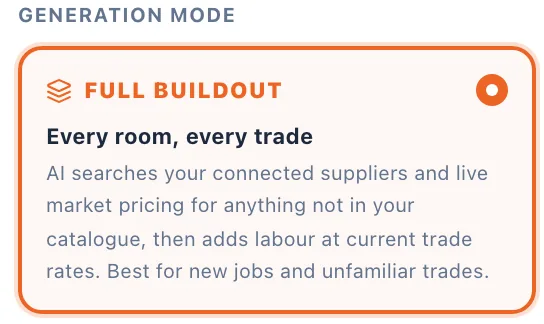
Your material catalogue, your labour roles, your markup. Choose price-book-only and it uses nothing else. Choose full buildout and it will find a figure for a trade you have never bought, and tell you which lines those were.
It leaves a gap rather than a guess
A line it cannot price comes back blank with the reason written next to it. A wrong rate on a tender is worse than a hole you can see, because you will find the hole.
Takeoff
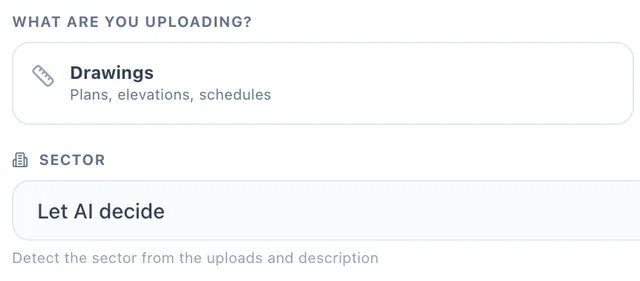
Measure the drawings without a scale rule
Upload the plan set, the elevations and the spec together. It reads DXF geometry directly where the drawing carries it, and works off the annotated dimensions where it does not.
- Room by room, with an area schedule and a trade package list
- Every quantity graded high, medium or low, with what it was read from
- The measurements it could not settle, phrased as questions to ask on site

Site photographs
Scope a job off a walk round
For the work that never arrives as a drawing. Photograph it, or talk it through and let it transcribe, and the scope of works comes back written up.
- One observation per photograph, in order, with the condition rated
- Counts are graded high; anything sized off a reference is capped at medium
- What a camera cannot measure comes back named, not invented
Estimating
You set the rules before it prices
The choices are yours and they are made up front, not argued with afterwards. Whether it may price beyond your catalogue, how labour is costed, how it is presented.
- Full buildout or price book only
- Labour off your own trade roles, or a single day rate
- Labour split by component, or shown as one line
- Prelims and contingency as percentages you set, with the typical range printed beside them
Variations
It reads the message and spots the extra work
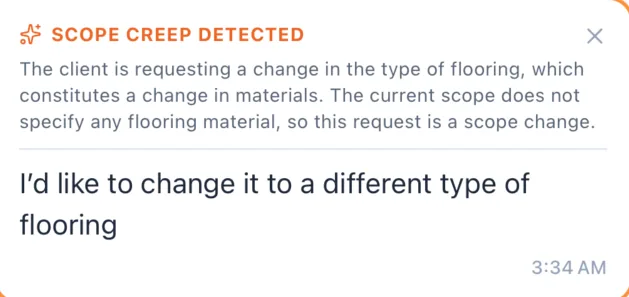
“While you are there, could you also...” is how margin leaves a job. BuiltUp reads the client's own message and raises what falls outside the agreed scope as a priced variation.
- Flagged where it was asked, in the thread, with the reasoning shown
- You can disagree with it before anything is raised
- Approved by the client before anyone lifts a tool
Programme
It watches the weather and the deliveries
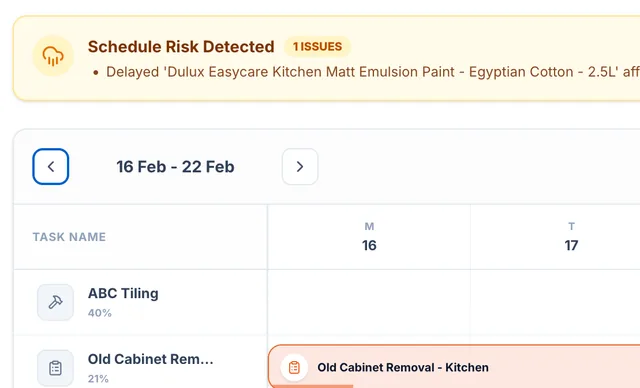
The programme is built from the work that was actually priced. Then it is re-planned around the forecast and around any ordered material running late.
- Outdoor tasks moved when the forecast turns
- A late delivery shows against every task that depends on it
- Nothing moves without you accepting it
Health and safety
RAMS drafted from the trades you priced
Hazards and control measures come from what the work actually involves and the site conditions you declare. No electrician on the job, no electrical hazards.
- A draft, and the screen says so: it is not a RAMS until a competent person approves it
- Approval locks the version, so what people were briefed on can always be produced
- Editable before approval, because the model does not know your site

Where it stops
What it will not do.
This is the part worth reading. Anything that will price a job for you can also quietly get it wrong, and the only useful question is what happens at the edge of what it knows.
It will not fill a cell to look finished
A line it cannot price is left blank with the reason in the comments column. On a client's own schedule that means a visible gap in their document, which is the point.
It will not invent a schedule code
On term work every code is checked by exact lookup against your own licensed library before it prices anything. A code that does not verify becomes an uncoded line. Uncoded beats wrongly coded.
It will not give you a number without its working
Every measurement carries a grade and a note recording what it was read from. Every priced line opens into the materials and labour behind it.
It is not health and safety advice
The RAMS draft saves you the typing. It does not know your site, and it is marked not for use until somebody competent has read it, changed what is wrong and signed it off.
One real job: a client's 33-item schedule of works came back priced to within about 6% of the figure their own estimator had reached by hand. That is one job, not a benchmark, and it is not being presented as one. Price something you already know the answer to, and judge it on that.
FAQ
Questions people actually ask.
Whose rates, what it does with UK work, and what you can bring with you.
Got a question we missed? Email support@builtup.io.
Price a job you already know the answer to.
That is the only test that will tell you anything, and it costs nothing to run.
Three AI estimates and three takeoffs on the free plan. No card.
Or set it up with us, 30 minutes, screen-shared