
Takeoff · Scope · Estimate
Win the job on the number. Keep the margin after.
Hand over the drawings, the site photographs, or the client's own schedule of works. BuiltUp measures it, writes the scope and prices it against your rates, then holds the line on every variation once the job is running.
No card. One active project free, with no expiry.
The whole job
Control the job from the first drawing to the final account.
The estimate is where BuiltUp starts. It is not where the job ends, so the contracts, variations, orders and invoices carry the same numbers forward and nothing gets re-keyed between the quote and the final account.
Answer the tender in their own document
Their spreadsheet comes back priced, in their sections, at their item references, in their order. Their original is never written back to, so their surveyor checks your rates line by line in a document they already know.
Price it off your rate book, not an average
Your materials, your labour roles, your markup. Price book only uses nothing but your own rates. Full buildout will find a figure for a trade you have never bought, and tell you which lines those were.
Get paid for the extras you were asked to do
The ask arrives as a message, not as a variation order, so BuiltUp reads the messages. What falls outside the agreed scope is raised as a priced change order and approved in the client's portal before anyone lifts a tool.
Hold the record when the job turns
Correspondence, changes, contracts, photographs and site attendance sealed into a dated pack with a fingerprint of its own contents, plus a list of where the record is thin while there is still time to fix it.
Schedule of works
Price the client's own schedule of works
Work arrives as their spreadsheet with an empty rate column. It goes back priced in the same document: their sections, their item references, their wording, in their order. You answer the tender in the form they asked for it, which is the form their surveyor can check line by line.
Their original is never modified
What you upload
Washroom_Refurb_SoW.xlsx33 items, in their sections. Rate, total and comments columns empty.What BuiltUp does
- Finds the header row wherever it is, and maps their item, description, quantity, unit, rate, total and comments columns.
- Prices every line against your own material catalogue and labour roles, in source order, never re-sorted.
- Leaves what it cannot stand behind blank, with the reason written beside it.
What you end up with
Washroom_Refurb_SoW - priced.xlsxTheir layout, their wording. Only the rate, total and comment cells written.Washroom_Refurb_SoW.xlsxYour upload, exactly as it arrived. Never written back to.
Takeoff
Stop measuring drawings by hand
Upload the plan set, the elevations and the client's spec together. It comes back measured, grouped by room and by trade, in m², ft², linear metres, items, hours or days and nothing else.
- Every row graded HIGH, MEDIUM or LOW with a note saying what it was read from, so you check the handful it was unsure about instead of re-checking all of them
- PDF, DXF, PNG and JPG, with a spec or works order alongside as XLSX or CSV
- Areas measured off the drawing are stored against the job, so the same floor is not 20 m² one week and 50 m² the next
- Site photographs run in a separate mode, because a photograph shows condition and content and carries no dimensions
3 in total until Pro, then unlimited
Explore takeoff
Where the drawings go in, with the grading rule stated before it runs rather than explained afterwards: a dimension drawn on the plan is HIGH, one counted off symbols or scale is MED, one inferred from context is LOW and wants checking.
Estimating
See what your method actually cost you
One estimate, three ways to read it: the working grid, the same numbers laid out as the document you uploaded, and a comparison putting BuiltUp's figure next to your own estimator's and next to the final account.
- Two different questions, was the method right and how did the job go, so the two variances are shown apart and never averaged into one flattering number
- Every line opens into the material, the labour and the markup behind it
- Prelims and contingency are percentages you set, with the typical range printed beside them
- Labour reads as time: a trade returned as a lump sum is converted into the days that money buys, so it can be checked against a programme
- Every line says where its rate came from: your catalogue and rate card, a price read from a named merchant on a stated date, or a figure judged for the job, and a panel totals that in money rather than in lines
- The estimate is handed back as soon as it is written and the merchant price checks carry on behind it, with a bar that says how far through they are and when they are done
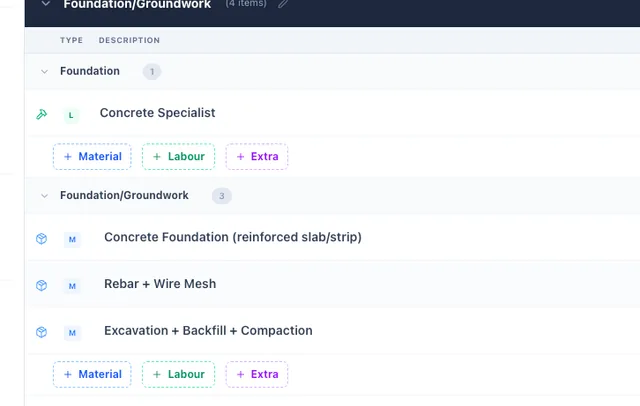
The working grid. Near-black section bands carrying their own subtotals, every row broken out into material, labour and extra, and every row ending in a total set in orange.
Variations
Stop doing work you never priced
“While you're there, could you also…” is how margin leaves a job. BuiltUp reads the client's own message, flags what falls outside the agreed scope, and turns it into a priced change order.
- Flagged where it was asked, in the thread, with the reasoning shown beside the flag
- You can disagree with it before anything is raised
- The client approves or rejects it in their portal, with the cost, their price and the schedule impact on it
- Approved, it writes into the live estimate and an invoice can be raised from it
Any paid plan
Explore variations
Two asks in one thread, both flagged where they were made. It reads the message. It does not answer it for you.
Health and safety
RAMS drafted from the job, not a template
Hazards and control measures are derived from the trades actually priced on your estimate and the site conditions you declare: occupied, pre-2000, work at height, public access. No electrician on the job, no electrical hazards.
- Risk ratings are recomputed on the server from the likelihood and severity chosen, rather than trusted from the browser
- Every document is a draft until a named, competent person approves it, and the draft status is printed on every page
- Approval locks the version, so what people were briefed on can always be produced
Pro
Explore RAMS
The product says it before we do: what this produces is a draft, and a draft is not a RAMS until somebody competent has read it, changed what is wrong and signed it off.
The record
Be the one with the record
Correspondence, changes, contracts, quotes, invoices, files, site attendance and the programme, copied and fingerprinted rather than read live, sealed into a dated pack hashed over a canonicalised snapshot.
- A verify step recomputes the hash, so a later alteration no longer matches
- Exports as a PDF with lettered appendices, or as a ZIP with every original file and its own checksum
- It reports what is missing from the record, graded, while there is still time to do something about it
Pro
Explore evidence packs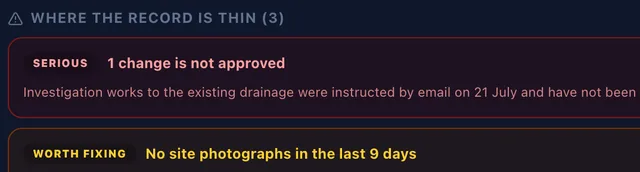
A sealed pack with a fingerprint of its own contents. Under it, the part that earns the name: a change instructed by email and never approved in writing, nine days without a site photograph, an invoice past its date with no reminder sent.
Materials
Quotes that do not go stale on the desk
Import the price list a merchant emailed you, from a spreadsheet or straight from the PDF, with every parsed row shown to you before anything is saved and no price ever guessed.
- Each row arrives with a high, medium or low confidence and the raw source line and page it came from
- A row with no readable price blocks the import rather than being guessed at, and scanned or photographed lists are refused with an explanation
- Tracked products are re-checked against your suppliers, and you are told which live quotes moved and what it did to the margin
Import free, sync on Pro
Explore supplier pricing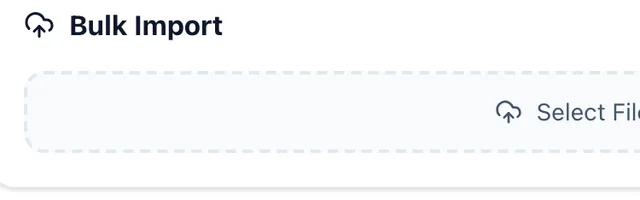
What an import lands in: the merchant's own product name, your price, your SKU, grouped the way you group them. Estimates price off this, so a change here is a change everywhere it is used.
BuiltClip
Clip a price off the merchant's own page
Open a product on a supplier's website and clip it. Name, price, unit, category and photograph go straight into your catalogue with the supplier already filled in.
- A browser extension for Chrome, Firefox, Edge and Safari
- What it captures is what the page said at the time, so treat it the way you would treat a printed price list
- On the free plan, and it carries a beta badge in the product
All plans, beta
Explore the plans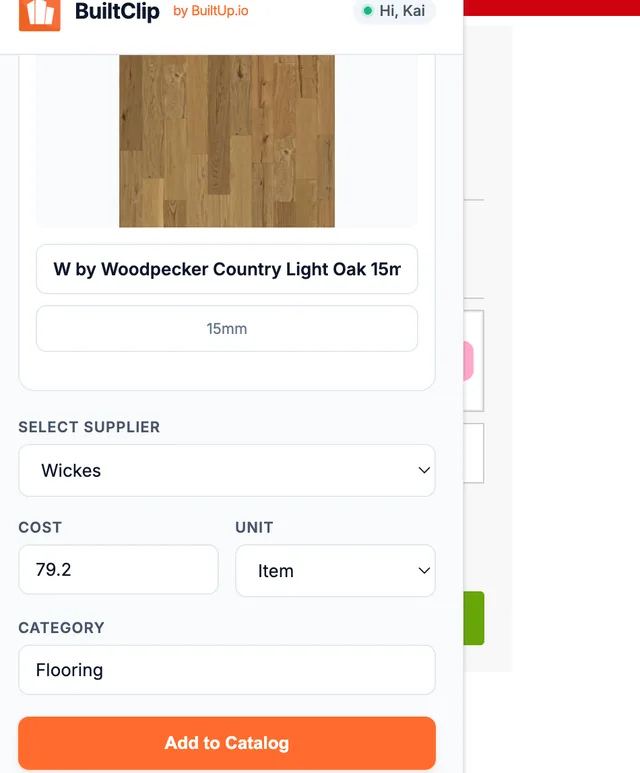
Read off a live supplier listing: the product name, the cost, the unit and the category, with the supplier set to the merchant whose page it came from.
Accounting
Raise the invoice once. It lands in Xero or QuickBooks.
Two integrations, and only two. Connect your accounting package and the clients and invoices you raise in BuiltUp are written across without anybody typing them a second time.
Xero
A BuiltUp client becomes a Contact. An issued invoice becomes a sales invoice against it.
Asks for accounting.transactions, accounting.contacts and accounting.settings.
QuickBooks Online
A BuiltUp client becomes a Customer. An issued invoice becomes an invoice against it.
Asks for com.intuit.quickbooks.accounting. Online only, not QuickBooks Desktop.
Connect it once
Settings, Billing, Integrations. You are sent to Xero or Intuit to sign in and approve the scopes, and you pick the organisation or company file it should write to. The connection refreshes its own token, so you are not reconnecting it every fortnight.
Issue an invoice as you normally would
There is no sync button and no nightly job. Issuing an invoice, or changing one that is already issued, is what sends it. Editing a client's details sends the client on its own. A draft invoice stays where it is: nothing reaches your accounts until you have actually issued it.
The client goes over first, then the invoice
The client is pushed ahead of the invoice so the invoice has something to hang on, matched on the client's name so you do not end up with a second copy of a customer you already have. Then the invoice follows with its number, its date, its due date and its lines, discount included.
What it is not.
Plenty of software in this category says “integrates with Xero” and leaves you to find out what that meant. Here is what it means here.
- It goes one way
- BuiltUp writes into your accounting package. It never reads back out of it. Mark an invoice paid in Xero and BuiltUp will not know, because there is nothing in the integration that asks.
- It is not reconciliation
- No bank feeds, no chart of accounts, no VAT return, no expenses, no payroll. Your accounts stay your accounts and your bookkeeper carries on exactly as they were. This saves the re-typing, not the bookkeeping.
- Connect one, not both
- Every connected package gets a copy of the same invoice, so running Xero and QuickBooks side by side posts it twice. If you are moving between them, disconnect the old one first.
- Worth checking the first few landed
- If a push fails, at the moment it is logged on our side rather than raised in the app, so glance at the accounting package after your first few invoices rather than assuming. We would rather tell you that than sell you a guarantee we cannot currently make.
Numbers
Four figures, and where each one comes from.
Three of these are counts you could verify by using the product for an afternoon. The fourth is the only outcome figure that exists, and it is one job.
- 6%How close one job came
- A client's 33-item schedule of works came back priced to within about 6% of the figure their own estimator had reached by hand, in their spreadsheet, with their original untouched.One job, not a benchmark.
- 27Rates in the labour benchmarks
- Each at a low, mid and high day rate, sourced in code from published trade averages, Spon's 2024 and BCIS 2024 location factors. Twenty-six are trades. The twenty-seventh is skip hire, which is a day rental rather than labour.
- 12UK regions the rates index across
- Including Scotland, Wales and Northern Ireland. The region comes off your postcode and you can override it.
- 21Contract templates
- Minor Works through to Framework Agreement, with the clauses editable and signature capture in the browser.
No adoption statistics, no customer count and no star rating, because none of those exist yet and inventing them would be the fastest way to lose an estimator. Price something you already know the answer to, and judge it on that.
Everything else
The whole list, one line an item.
Where a capability is limited to a plan, the plan is on the row. Where it is thinner than the name suggests, the row says that too.
Getting the work measured
- Takeoff from drawings
- Pick the sector or let it decide from the uploads. Scaled geometry is read directly where the drawing carries it.
- 3 in total until Pro
- Takeoff from site photographs
- One observation per photograph, in order, with the condition rated. It will not produce an area schedule from ordinary site photos.
- 3 in total until Pro
- Confidence on every row
- HIGH, MEDIUM or LOW against each measurement, with a note recording what it was read from.
- Trade packages
- The work grouped into named packages with a summary and an item list each, near enough the enquiry, written.
- The measurements to go and take
- What it could not settle, phrased as a question you could ask someone standing on site, with the value it assumed in the meantime.
Pricing it
- The client's own schedule of works
- Their workbook back, priced, at their true row numbers. Only the rate, total and comment cells are written.
- AI estimating
- From a dictated walk round, site photographs, drawings or their schedule, costed against your own catalogue and labour roles.
- 3 in total until Pro
- Two pricing modes, named honestly
- With an empty catalogue the first estimate is largely its own figures. The more of your rate book is loaded, the more it is your estimate.
- Regional labour benchmarks
- 27 rates at a low, mid and high day figure across 12 UK regions, with a location index applied. Anything you have edited is never overwritten.
- Schedules of rates for term work
- Your own NSR, M3NHF or in-house schedule under your own licence, with the agreed uplift applied. BuiltUp supplies no rate data.
- Ultimate, beta
- Material tiers
- Good, better and best carried against a line where a catalogue match exists, with your margin shown at each. The client chooses and the quote reprices.
- Scope templates
- Save a job you price often and start the next one from it.
Turning it into documents
- Quotes
- Versioned so a previous quote is never lost, with VAT, uplift and deposit terms, accepted or rejected in the client's portal.
- Scope of works
- The written description, separate from the priced grid, because what a client signs off is the description and not the build-up.
- 3 in total until Pro
- 21 contract templates
- Signature capture with the signer's name, a drawn signature, their IP, a timestamp and an audit entry. Not DocuSign, and not a qualified electronic signature.
- RAMS from what was priced
- Risk ratings recomputed on the server. A draft until a named, competent person approves it, and it says so on every page.
- Pro
- Evidence packs
- Sealed, dated and hashed over a canonicalised snapshot, with a verify step that proves the record is intact.
- Pro
- Full audit trail
- Every action logged, every change tracked, every deletion recorded.
Buying the materials
- Price lists from a PDF
- Every parsed row shown with its confidence and the raw source line. Nothing is written until you confirm the grid.
- Purchase orders by supplier
- One action turns the priced scope into orders ready to send. Receipting is per item, and delayed and incorrect are proper states.
- Any paid plan
- Supplier catalogue and price refresh
- A cost and an override cost per item, category-level overrides, and a warning when a change lands on a quote that is still open.
- Barcode and product lookup
- Scan on site and it reads the supplier's own website for the product, then falls back to a global barcode database. Your stored catalogue is a separate search.
- BuiltClip browser extension
- Clip a product off a supplier's website into your price book. Chrome, Firefox, Edge and Safari.
- Beta
Running the job
- Programme and progress
- Tasks per trade with dates, a progress percentage and an assigned team, by week, by month, as a list or on a timeline. In the product this is called Progress.
- Weather and delivery re-planning
- Re-planned around the local forecast and around order items marked delayed on receipt. Every task it moves carries a note, and there is a dry run.
- Pro
- Variations and change orders
- A cost, a client price and a schedule impact, approved in the portal. Clients can raise one themselves.
- Scope Creep Guard
- Reads the client's own messages and flags what falls outside the agreed scope, then offers to convert the message into a change order.
- Any paid plan
- Subcontractor portal
- An access ID and passkey, or a site QR code. No app install, no BuiltUp account. Site attendance is the time tracking; there is no separate timesheet product for your own staff.
- Ultimate
- Project messaging and files
- Threads against the job, internal or client-visible, with read receipts. Files carry a visibility setting each.
- Client portal
- Your branding at your own link, enabled per project, optionally password protected, with separate switches for the budget and for reference codes.
- Finish selections
- At least two named options each with an image or swatch, a price impact and a due date, from awaiting to selected to confirmed to locked.
Getting paid
- Invoicing
- Built from the quote as a single payment, a deposit and final, or milestones, so the numbers are not re-keyed. Discounts, late fees and automatic chasing.
- Card payments via Stripe
- Paid out through Stripe Connect to your own account. BuiltUp takes a platform fee on top of Stripe's own charges: 2.5% on Free, 1% on Basic, 0.5% on Pro and 0.25% on Ultimate.
- VAT that matches what you charge
- Stored and editable per line, with an account default and a per-project override. A mixed job shows the amount charged at each rate rather than one merged line.
- WIP reporting
- Over and under billing across every active job: contract, billed, earned revenue, actual cost, margin and percentage complete, with a PDF.
- Pro
- Profitability and margin analysis
- Margin erosion by trade, combined overrun impact, break-even, contingency, daily overhead and estimated days on site.
- Report on Ultimate
- Xero and QuickBooks Online
- Connect by OAuth and every invoice you issue is pushed across, with the client pushed ahead of it. Those two packages only. It writes into your accounts and never reads back out of them.
- Ultimate
- Import and export
- Clients, projects and scope items from a CSV. Client and project duplicates are flagged in the preview before anything is written; scope items are validated but not de-duplicated. Data export and account deletion are in settings.
Where you work
- iOS and Android apps
- Native apps, not the website in a frame, carrying most of the project screens plus clients, suppliers, labour roles and financials. RAMS and evidence packs are on the dashboard only.
- Seats, roles and workspaces
- Team members invited by email with a role. Extra seats are a paid add-on and the price is on the pricing page.
- Custom roles and multiple workspaces on Ultimate
- Two-factor authentication
- TOTP, set up from your profile. Google and Apple sign-in are also supported.
And the things it does not do.
You will find these out eventually. Better here than in month two, and better from us than from a competitor.
- CIS deductions
- You can carry a CIS classification code on a scope line. There is no deduction calculation, no 20% or 30% withholding, no gross-payment-status handling, no monthly return and no subcontractor statement.
- Retentions and applications for payment
- Invoicing runs on deposits, milestones and final accounts. There is no retention ledger, no application-for-payment cycle and no payment or pay-less notice handling.
- Deciding your VAT liability
- Mixed rates are handled properly and you can set 0% on a zero-rated new build. Nothing works out whether your job qualifies, and there is no reverse-charge logic. Set the rate deliberately.
- A connector to Procore, Buildertrend or CoConstruct
- There is none. You would export a CSV from them and map it like any other spreadsheet.
- True multi-currency
- A workspace works in one currency. No exchange-rate table, no per-project currency and no consolidated multi-currency reporting.
- Certificates and statutory notifications
- No EIC, EICR, Part P notification, Gas Safe notification or Landlord Gas Safety Record. Certification is priced as a line of work.
- A measurement standard
- No claim of NRM2 or CESMM4 compliance, and no bill in a standard's prescribed format. It measures, labels in the wording a schedule of rates would use, and grades its own confidence.
Everything from the signed contract onward, the subcontractor portal, the orders, the programme and the WIP figure, is on run the job.
What each plan costs, and what an extra seat costs, is on the pricing page. Which of this matters to the work you actually do is on the trade pages.
Where to next
Six pages that go deeper than a row in a list.
The list above is the whole product in one line an item. These are the parts with an argument behind them, written out properly.
- Price a schedule of worksTheir spreadsheet in, priced, back out in their own layout. The one thing in this category nobody else does.Read on
- What the AI does, and where it stopsWhich parts are a model, which parts are arithmetic, and what it refuses to guess at.Read on
- Schedules of ratesYour own NSR, M3NHF or in-house schedule, under your licence, with your contract uplift applied.Read on
- Who it's forNine trades, each entering the product through the document their work actually arrives as.Read on
- How BuiltUp comparesAgainst the platforms you are weighing it up with, and against the spreadsheet you are using now.Read on
- Security and where the data goesWhere a client's tender sits once you have uploaded it, and who can reach it.Read on
On the job
The estimate goes where the job is.
Most pricing gets done at nine at night because the tool for it is on a desk. The iOS and Android apps carry the same jobs, the same rate book and the same numbers, so a change made standing in somebody's kitchen is the change the office sees.
Price it in the van
Open the job, adjust a rate, see the profit move. The figure on the phone is the figure in the office, because it is the same job.
Photograph the works
Shoot the condition as you walk it and dictate what needs doing. Both land on the project rather than in your camera roll.
Chase what you are owed
Outstanding, overdue and who has not paid, on the screen you already have in your hand.
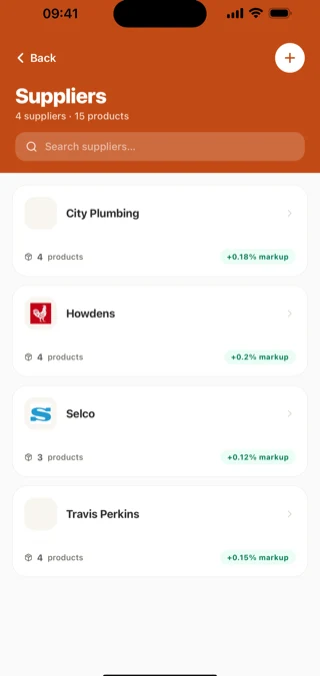
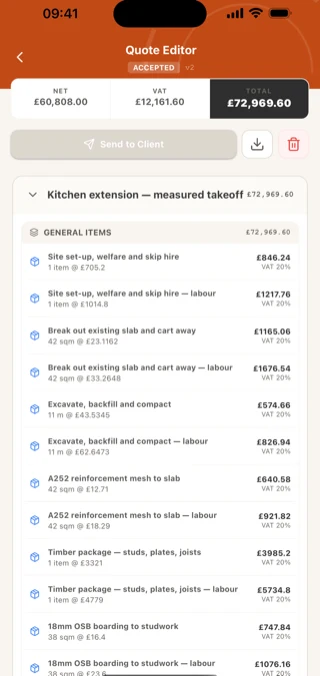
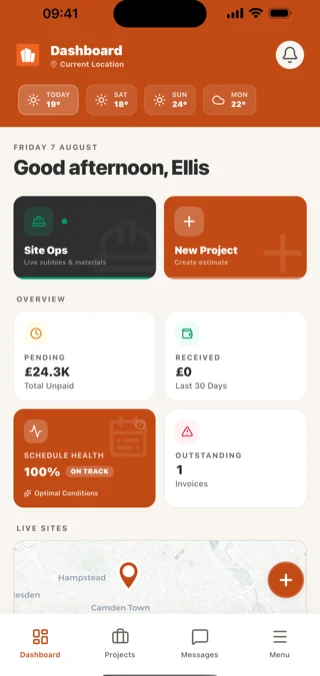
What stays on the desktop: measuring a drawing, generating an estimate with AI, coding to a schedule of rates, and handing a client's spreadsheet back in their own format. Those want a big screen and they have one. See the full platform
FAQ
Questions people actually ask.
Whose rates, what it does with UK work, and what you can bring with you.
Got a question we missed? Email support@builtup.io.
The next set of plans lands today.
Upload them, or the schedule of works your client sent you, and see the priced scope before you decide anything.
No card. One active project free, with no expiry.
Or set it up with us, 30 minutes, screen-shared