
Contracts · Site · Orders · Reports
The quote was the easy part.
Then somebody has to build it. The contract, the subbies, the orders, the programme, the client's finish choices and the question of whether you are over-billed all run on the same job in BuiltUp, off the numbers you already priced.
No card. One active project free, with no expiry.
After the yes
The margin you priced is the margin you lose on site.
A good estimate is worth nothing if the contract is unsigned in an inbox, the subbie ordered the wrong board, and nobody worked out until month four that the job was billed ahead of what it had earned. All of that runs on the same project record as the price.
Put the subbies on the job, not on your phone
An access ID and a passkey, and they are in on their own phone. Tasks, site instructions, clock on, clock off. No app to install, no account to make, and no sight of what you are charging.
Get it signed the day you send it
The contract goes out on a private link. You are emailed the moment it is opened, and what comes back is a signature, a name, an IP address and a timestamp attached to the document.
Order off the priced scope
The materials you priced are already grouped by merchant with your waste factor on them. One action turns them into an order each, so nobody is retyping a cutting list at half six.
Know if you are over-billed before your accountant does
Put a percentage against each stage of the programme and the WIP report earns revenue against it, then sets that beside what you have actually invoiced.
Subcontractor portal
Your subbies get a login, not a group chat
Add a firm to the job and BuiltUp mints an access ID and an eight character passkey and emails it over. They sign in on the phone in their pocket, read the instructions you left, clock on and work down their tasks. The login screen carries your name and your colours off the job site code, so it does not look like somebody else's software.
- Clock in and clock out record a location stamp and, if they take one, a site photograph against the shift. It is a record of where the phone said it was, not a check that anybody is on site.
- Tasks carry a description, a due date and a completion photo. You either verify one or raise a snag against it, and the snag emails the trade the wording you typed.
- They raise material and reimbursement requests with a photograph of the receipt, and you approve or reject each one.
- Every firm has a start date and an expiry you set. Deactivate one or reissue a passkey without touching anything else on the job.
- There is no money in the portal at all. No quote, no invoice, no margin, and no other trade's tasks or hours.
Ultimate
See what the plans include
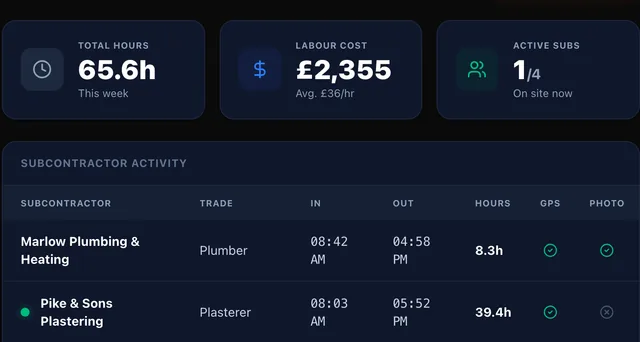
The shift a plasterer starts from his phone: the site address, the instructions left for his trade, and the time he clocked on. There is no quote, no invoice and no margin anywhere in it.
Contracts and signature
Send it, watch it open, get it back signed
Twenty-one templates, Minor Works through to a Framework Agreement, plus change order forms and practical completion certificates. Edit the clauses, address it to the client or to a subcontractor, and it goes out on a private link with your branding on it.
- It moves through Draft, Sent, Viewed, Signed and Rejected, and you are emailed the moment somebody opens it rather than finding out when they reply.
- What comes back is the signature they drew, the name they typed, the IP address it came from and the timestamp, written into the audit log.
- A contract addressed to a subcontractor lands in their portal, so a labour-only subcontract gets signed in the same place they clock on.
- Versions are kept, so re-sending an amended agreement does not lose the one before it, and a signed contract cannot be deleted.
- It is a captured signature and an audit trail. It is not a qualified electronic signature, and a document takes one signature rather than two.
All plans, including Free
See the whole list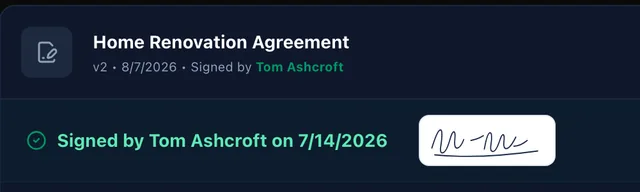
Five documents on one job, each in its own state, with the client's agreement opened to show what came back attached to it.
Purchase orders
Turn the priced materials into orders by merchant
Every material in your catalogue carries a supplier. One action reads the priced scope, groups the lines by merchant, applies the waste factor you set on each and produces an order each as a PDF.
- Quantities come out with waste already applied and the SKU on the line, added up across rooms, so one merchant gets one order rather than four.
- The PDFs email to you rather than to the supplier, so nothing leaves the office before somebody has read it.
- Receipting is per item. Received, delayed and incorrect are proper states, each with a note and a revised date.
- An item marked delayed is what raises the schedule risk on the programme, so a late delivery and a late stage are the same event rather than two.
- There are no prices on the order. It is a schedule of what to send, and any scope line whose material has no supplier against it is quietly left off.
Basic and above
Explore supplier pricing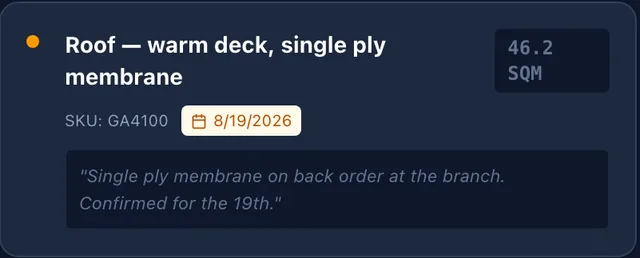
Three merchants, three states. Travis Perkins received in full, Selco part delivered with the membrane on back order, Howdens still out.
The programme
A stage, a percentage, and the trade who is on it
Named stages with planned dates and actual dates, a percentage each, a colour and an icon, and the subcontractors assigned to them. Read it by week, by month or as a list.
- The percentage you set on a stage is the same number the WIP report earns revenue against, so the programme and the money cannot quietly drift apart.
- A purchase order line marked delayed raises a risk against the stage it holds up, naming the material and the trade rather than just flagging a date.
- Weather and delivery re-planning will move the tasks for you, with a note on every task it touches and a dry run before it commits.
- Changes push live, so a second person with the job open sees it move.
- Stages do not depend on one another. There is no critical path, so moving groundwork does not move the roof.
Programme on all plans, re-planning on Pro
See the whole list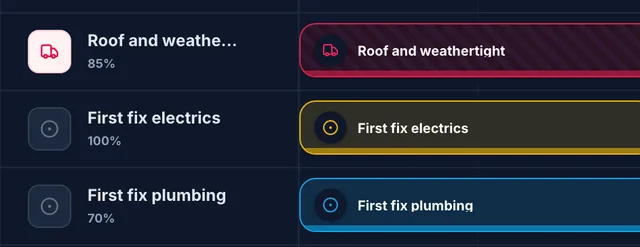
Sixty per cent complete, with a risk raised off a real delivery. The single ply membrane went on back order at the branch, and the roof stage is what it holds up.
Finish selections
Stop chasing the client for a tile choice
Put the decision in their portal instead of in a text message. At least two named options, a photograph or a colour swatch on each, what it does to the price, and the date you need an answer by.
- They pick in the portal and can leave a note with it, which you read against their choice rather than in a separate thread.
- It runs Awaiting, Selected, Confirmed and Locked. Once you lock it they cannot change it, which is the point of locking it.
- Grouped by room, so a kitchen's worktop, doors, floor and paint sit together instead of scattered down a thread.
- The price impact is text you write. It informs the choice and it does not reprice anything, so nothing here moves the quote on its own.
- Nothing chases. The due date is there for you to chase against.
All plans, including Free
See the whole list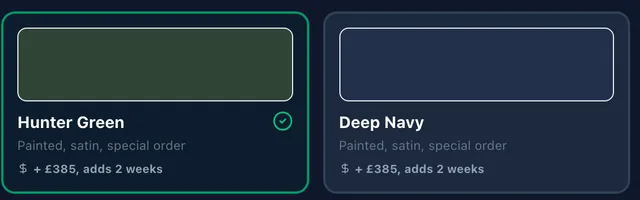
Four decisions on one kitchen, one of them opened out. Two doors included in the allowance, two at plus £385 and a fortnight, the client's choice ticked and their question sitting under it.
WIP and profitability
Whether you are over-billed, one line a job
Contract value, percentage complete, earned revenue, what you have invoiced, actual cost, and the gap between the last two, across every job that is running. It exports as a PDF, per job or the lot together.
- Earned revenue is the contract value at the percentage your programme says, and the over or under billing figure is that set against your invoices.
- Actual cost prices your subcontractors' clocked hours at their labour rate, so the hours logged on site are the hours in the report.
- Job profitability sits on the tab beside it: revenue, cost, profit and margin, one row a job.
- Material cost is the figure you estimated, apportioned by percentage complete. It is not what you actually spent, because BuiltUp holds your orders and not your merchant invoices.
- The percentage is an unweighted average of your stages, so set your stages at a size where averaging them is a fair reading of the job.
WIP on Pro, profitability on Ultimate
See what the plans include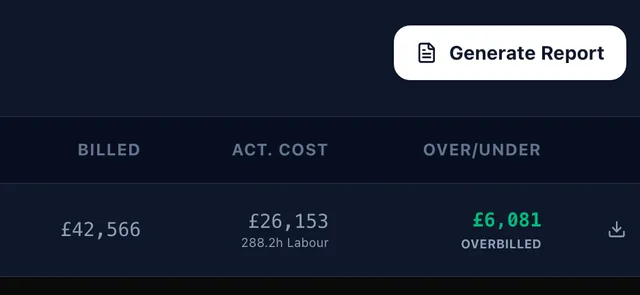
One job's line. £60,808 contracted, sixty per cent complete, £36,485 earned against £42,566 invoiced, which puts it £6,081 over-billed.
The limits
And the things it does not do.
Six capabilities above, and here is where each of them stops. You would find these out eventually. Better now than in month two, and better from us than from somebody selling against us.
- It does not prove anybody was on site
- Clocking in stores the coordinates the phone reported and, optionally, a photograph. There is no geofence, no radius check and nothing stopping a trade clocking on from the van. Treat it as a record, not a turnstile.
- No CIS, no retentions, no applications for payment
- A scope line can carry a CIS classification and nothing calculates a deduction from it. There is no retention ledger, no application-for-payment cycle, and no payment or pay-less notices.
- The order carries no prices and does not reach the merchant
- The PDF lists descriptions, quantities, units and SKUs, and it emails to you. Placing the order and agreeing the rate is still a phone call to the branch.
- Profitability compares a budget against actual labour
- Only labour runs on actuals, priced off clocked hours. Material cost is the figure you estimated, apportioned by percentage complete, because BuiltUp does not hold your merchant invoices.
- Nothing chases a finish selection
- You can put a date on the decision. Nothing emails the client when it passes, and raising a new selection does not notify them either. Ask them in the messages.
- The signature is not a qualified electronic signature
- A drawn signature, a name, an IP address and a timestamp in an audit log. Not eIDAS, not DocuSign, and one signature per document rather than a countersignature.
- The programme has no dependencies
- Each stage carries its own dates and its own percentage and nothing links one to the next. There is no critical path and no float, so pushing groundwork back does not push the roof.
- The portal is not a timesheet product for your own staff
- Shifts belong to subcontractors added to a job. There is no payroll, no rota and nothing for the people on your own books.
The same list for the estimating side of the product is on the features page, under the whole capability list.
Where to next
The half of the product that happens before any of this.
This page starts at the signed contract. Everything that gets you there, and the two documents that matter when a job turns, is written out elsewhere.
- Price a schedule of worksTheir spreadsheet in, priced, back out in their own layout, with their original untouched.Read on
- Takeoff, estimating and the restMeasured off the drawings, priced off your rate book, one line an item.Read on
- Dispute Shield evidence packsSealed, dated and fingerprinted, and it tells you where the record is thin while you can still fix it.Read on
- RAMS from the priced tradesHazards derived from the trades actually on the job. No electrician, no electrical hazards.Read on
- Invoices into Xero or QuickBooksIssued once in BuiltUp and written across to your accounts. One direction, and we say so.Read on
- What each plan costsIncluding which of the six above is gated, and what an extra seat comes to.Read on
FAQ
The questions a site manager asks.
What the subbies can see, what the signature is worth, what is on the order, and how the WIP figure is worked out.
Got a question we missed? Email support@builtup.io.
Start on the job you are running now.
Put the live one in, set the stages, and see the contract, the orders and the WIP line come off the same numbers you already priced.
No card. One active project free, with no expiry.
Or set it up with us, 30 minutes, screen-shared