The Best Project Management Solution for General Contractors in 2026
Running a general contracting business in 2026 means juggling multiple active job sites, dozens of subcontractors, clients who change their minds mid-build, and a cash flow cycle that can break you if one payment comes in late. Spreadsheets, WhatsApp groups, and gut instinct got you this far — but they are actively costing you money on every job. This guide breaks down exactly what a project management solution for general contractors should look like, what separates the tools built for GCs from the ones built for tech companies, and how the right platform pays for itself in the first month.
Why General Contractors Need Specialized Project Management Software
Let's be direct: Asana, Monday.com, and Trello were not built for you. They are excellent tools for software teams tracking sprints and marketing departments managing campaigns. But they have no concept of a change order, a progress claim, a subcontractor schedule, or a material price that changes every 72 hours.
General contracting is one of the most operationally complex businesses on the planet. On any given day, a GC might be:
- Managing 3–8 active job sites simultaneously
- Coordinating 10–25 subcontractors across different trades
- Tracking material costs that fluctuate weekly
- Handling client change requests that affect scope, schedule, and budget
- Processing progress invoices tied to milestones, not calendar dates
- Dealing with weather delays that cascade across the entire schedule
According to the Associated General Contractors of America (AGC), 70% of construction projects exceed their original budget, and 75% are delivered late. The root cause is almost never bad tradespeople — it is poor visibility into what is actually happening across the project.
A project management solution built for general contractors addresses these realities head-on. A generic PM tool forces you to build workarounds on top of a system that does not understand your world.
The 8 Features Every GC Project Management Solution Must Have
After talking to thousands of general contractors — from 3-person outfits to 50-crew operations — the same pain points come up again and again. Here are the features that separate a real GC solution from a dressed-up task board.
1. Live Budget Tracking with Real-Time Margin Visibility
This is the single most important feature, and the one most generic tools completely lack. A GC needs to know, on any given Tuesday, exactly where a project's budget stands — not a forecast, not last month's reconciliation, but the actual margin right now.
That means every purchase order, every subcontractor invoice, and every material delivery hits the project budget the moment it is recorded. When a $2,200 plumbing rough-in comes in $400 over estimate, you see it immediately — not six weeks later when you are doing your final reconciliation and wondering where the profit went.
The National Association of Home Builders (NAHB) reports that builders who track budgets in real time experience 32% fewer cost overruns compared to those who reconcile monthly or at project end. That is not a marginal improvement — it is the difference between a profitable year and a breakeven one.
"Last year I finished three jobs thinking I made money and found out at tax time I barely broke even. Scope creep and late sub invoices were killing me. BuiltUp caught two variations in the first week that I would have missed — that alone was worth $11,000."
2. AI-Powered Scope Creep Detection
Scope creep is the silent margin killer for every GC. The client calls your site foreman directly: "Can you move that wall 300mm?" Your foreman says sure, does the work, tells nobody. You find out when you are reconciling costs and there is no variation to bill against. That single phone call just cost you $4,000.
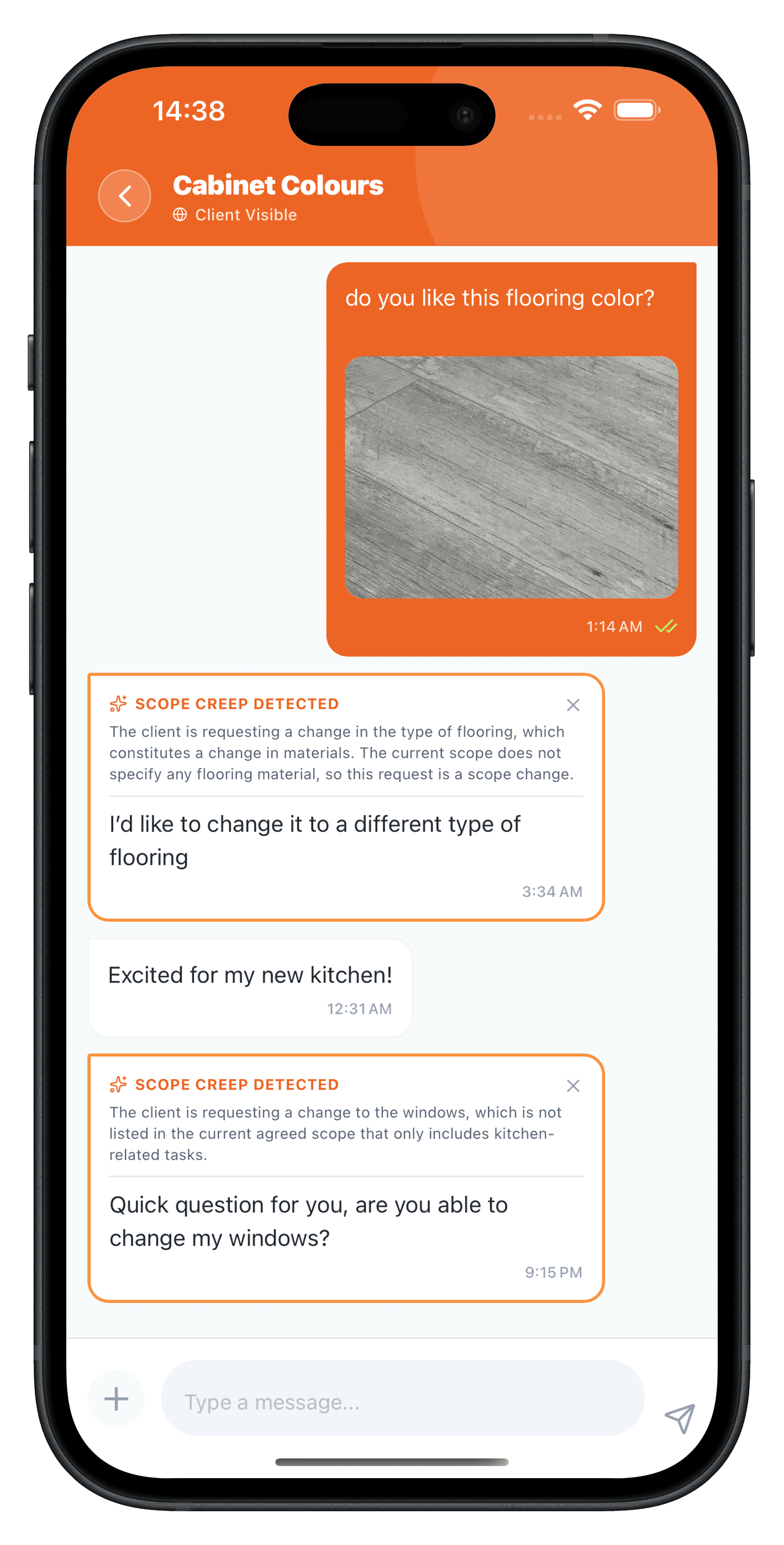
The best project management solutions for GCs now use artificial intelligence to monitor project communications — emails, portal messages, uploaded notes — and flag anything that looks like a scope change. The AI drafts the variation order with pricing attached, so you can send it to the client before your crew even picks up a tool.
The NAHB estimates that untracked change orders and extras account for 5–10% of total project cost on residential builds. On a $500,000 project, that is $25,000–$50,000 in work you performed but never billed. Multiply that across 8–12 projects per year, and the losses are staggering.
3. Subcontractor Coordination and Task Management
If you are spending half your week on the phone chasing subs — confirming who is showing up, finding out why the electrician did not come, juggling schedule conflicts — your PM software is failing you.
A GC-specific solution lets you assign tasks to specific trades with due dates, photos, specs, and site access details attached. When the framer marks rough-in complete, the drywaller gets notified automatically. When a sub is running behind, you see it on a dashboard — not when the next trade shows up and has nothing to do.
The best platforms also include GPS time tracking. Every clock-in requires a selfie and a GPS pin. You know exactly who showed up, what time they arrived, and when they left. When a subcontractor says they had three guys on site all day, you have the proof to agree — or disagree.
4. AI Estimating and Scope Generation
The speed at which you can turn a site visit into a priced proposal directly affects how many jobs you win. The average GC spends 6–12 hours preparing a single bid. AI estimating tools can compress that to 15–45 minutes.
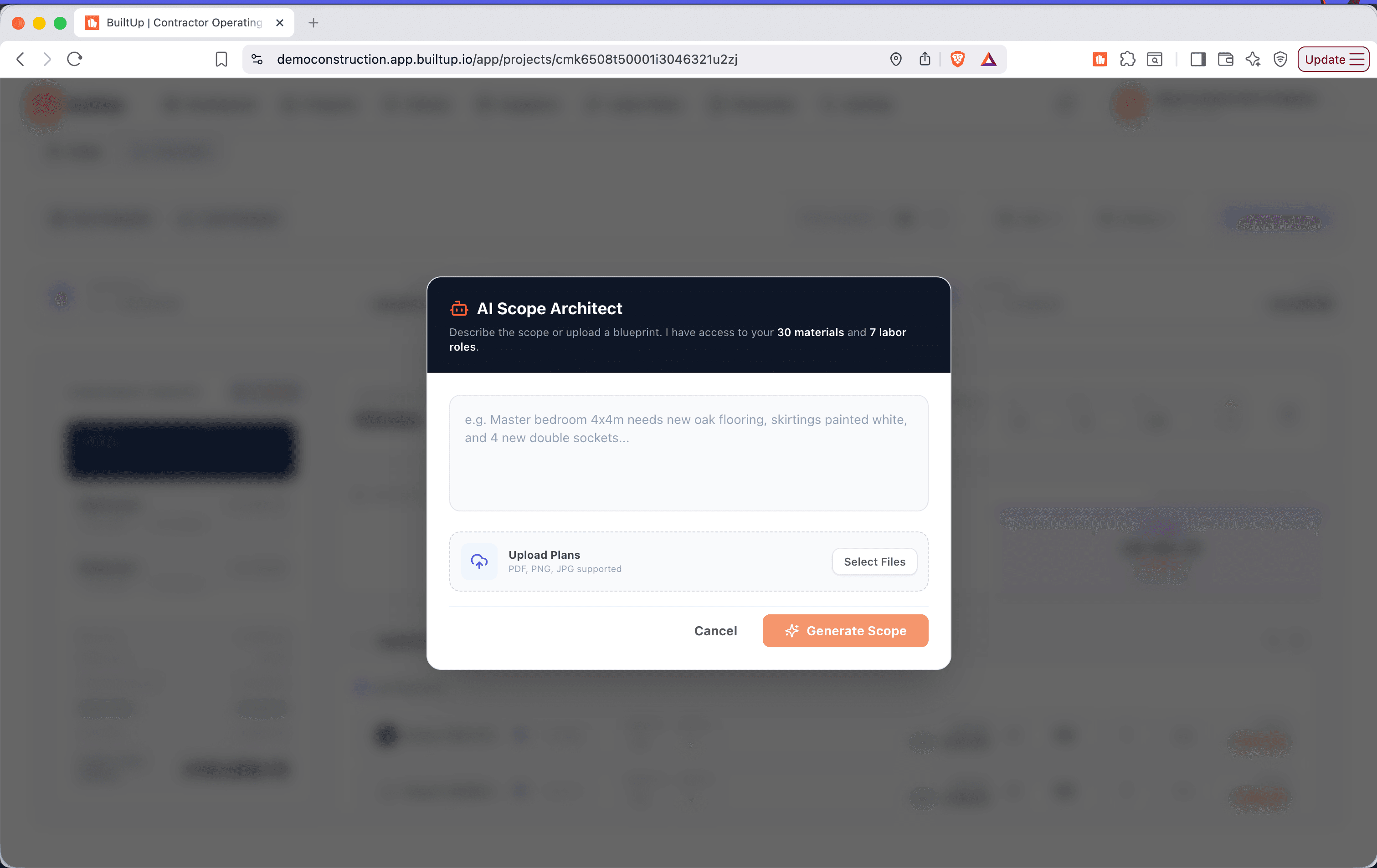
Here is how it works in practice: you walk a job site, describe the scope — "two-story renovation, full kitchen gut, three bathrooms, new HVAC" — and the AI builds a full priced scope using your labor rates and your supplier pricing. You review it, adjust as needed, and send a professional quote from the car park while your competitor is still driving back to the office to open Excel.
For GCs running multiple bids per week, the math is straightforward. If AI estimating lets you send two additional proposals per week, and your close rate is 25%, that is an extra two jobs per month. At an average project value of $150,000, that is $300,000 in additional annual revenue — from a tool that costs less than a single day of a junior estimator's salary.
5. Progress Invoicing and Payment Collection
Cash flow is the lifeblood of a general contracting business, and most GCs are terrible at invoicing — not because they are lazy, but because the process is painful. Converting a completed milestone into an invoice, chasing approvals, waiting for a check — the average GC waits 45–60 days to get paid on a progress claim.
A proper GC project management solution lets you convert any quote stage into a deposit, progress, or final invoice in two taps. The client gets a payment link, pays online via credit card or bank transfer, and the payment syncs to your accounting software (Xero, QuickBooks, MYOB). Contractors using online payment collection report average payment times of 3 days, compared to 21+ days with traditional invoicing.
6. Client Portal with Branded Experience
Your clients want to know what is happening on their project. Without a portal, they call you. Every day. "When is the tiler starting?" "Did you get the permit?" "Can I see photos?" Every one of those calls takes 10–15 minutes. Multiply that by 6–8 active clients and you are losing an entire day per week to update calls.
A client portal gives each client a branded login where they can see their project timeline, approve selections, view photos, download documents, sign contracts, and make payments — all without calling you. Contractors who deploy client portals report an 80% reduction in inbound client calls. That is not a nice-to-have — it is a full day of your week back.
7. Weather-Aware Scheduling
Rain does not care about your Gantt chart. A GC-specific PM solution integrates weather data into the project schedule. When rain is forecast, outdoor trades are automatically rescheduled and indoor trades are pulled forward to fill the gap. Your schedule adapts to reality instead of requiring you to manually reshuffle every trade every time the weather changes.
This matters more than most GCs realize. The AGC estimates that weather delays cost the average project 21 calendar days per year. Contractors using weather-aware scheduling tools reduce that by up to 40% — not by controlling the weather, but by eliminating the coordination lag between a weather event and a schedule adjustment.
8. Contracts, E-Signatures, and Document Management
A GC deals with contracts constantly — client agreements, subcontractor agreements, change orders, purchase orders. If you are still printing, signing, scanning, and emailing PDFs, you are adding days to every transaction.
Digital contract templates with e-signature support (fixed price, cost-plus, time and materials, sub agreements) eliminate the paper shuffle. A centralized cloud file manager keeps every plan, receipt, photo, and piece of paperwork in one place, attached to the right project. When a client says "I never approved that," you pull up the signed digital approval in 10 seconds.
GC Project Management Tools: A Feature Comparison
| Feature | Generic PM Tools | Legacy Construction Software | BuiltUp |
|---|---|---|---|
| Live budget tracking | No | Limited (often delayed) | Real-time, per project |
| AI scope creep detection | No | No | Yes — reads messages, drafts variations |
| AI estimating | No | No | Yes — voice-to-scope, plan upload |
| Sub coordination | Basic task boards | Yes | Yes — with auto-notifications and GPS tracking |
| Progress invoicing | No | Yes (often clunky) | Yes — 2-tap conversion, online payments |
| Client portal | No | Some | Yes — branded, with selections and payments |
| Weather-aware scheduling | No | No | Yes — auto-reschedules outdoor trades |
| Live supplier price sync | No | No | Yes — prices checked every 72 hours |
| Mobile-first design | Varies | Desktop-first | Yes — built for phones |
| Free plan available | Some | No ($5K–$10K+/yr) | Yes — free forever plan |
How BuiltUp Fits the GC Workflow — From Bid to Final Payment
Rather than listing features in a vacuum, here is how BuiltUp maps to the actual workflow a general contractor follows on every project.
Phase 1: Bid and Estimate
You visit the site, open BuiltUp on your phone, and describe the scope or upload plans. The AI generates a full priced scope using your rates and current supplier pricing. You review it, tweak line items, and send the proposal to the client — all before you leave the site. If you want to offer options, the Good/Better/Best feature auto-generates three material tier options with real margin comparisons so the client can choose their price point.
Phase 2: Contract and Deposit
Once the client accepts, you select a contract template (fixed price, cost-plus, or T&M), customize terms, and send it for e-signature. The deposit invoice generates automatically and the client pays online. You have a signed contract and money in the bank before the first nail is driven.
Phase 3: Schedule and Assign
Build your project schedule with BuiltUp's Gantt view, then assign trades to each phase. The weather-aware engine checks the 10-day forecast and flags conflicts. Subs receive task notifications with dates, specs, and site access details. When a sub confirms, it shows on your dashboard. When they don't, you get an alert — not a surprise no-show on Monday morning.
Phase 4: Build and Monitor
This is where the real value kicks in. As the build progresses:
- Budget: Every PO and sub invoice hits the live budget. You see your margin in real time.
- Scope changes: The AI monitors all project communications and flags potential extras. A variation order is drafted before the work starts.
- Sub progress: GPS time tracking confirms who is on site. Task completion triggers notifications to the next trade.
- Client updates: The portal keeps the client informed without a single phone call from you.
- Material prices: Supplier prices sync every 72 hours. If lumber spikes mid-project, you see the margin impact instantly and can adjust before it eats your profit.
Phase 5: Invoice and Close
When a milestone is complete, convert it to a progress invoice in two taps. The client gets a payment link and pays online. At project close, generate the final invoice with retainage release. Your full audit trail — every approval, photo, message, and change — is stored and searchable in case of disputes.
The Cost of Doing Nothing
Let's run the numbers for a typical GC running 10 projects per year at an average value of $400,000.
| Cost Category | Without PM Software | With BuiltUp |
|---|---|---|
| Margin lost to scope creep (5–10%) | $200,000–$400,000/yr | $8,000–$20,000/yr (98% captured) |
| Admin hours (chasing subs, invoicing, updates) | 20+ hrs/week | ~13.5 hrs/week (6.5 hrs saved) |
| Average days to get paid | 45–60 days | 3 days |
| Bids per week | 3–5 | 10–15 (AI-assisted) |
| Budget overrun rate | 70% of projects | Reduced by 32% |
| Software cost | $0 (but see the losses above) | Free plan available; Pro from $49/mo |
The typical GC who switches to BuiltUp recovers an average of 8% margin on their first project. On a $400,000 job, that is $32,000 — enough to pay for years of software on a single project.
What About Procore, Buildertrend, and CoConstruct?
These are established players, and they each have strengths. Here is an honest comparison:
Procore is built for large commercial contractors with enterprise budgets. It is powerful, but it starts at $10,000+ per year and requires significant onboarding. For a GC running residential or light commercial work, it is often overkill — and the cost is hard to justify when you are running a 5–20 person operation.
Buildertrend is popular with home builders and remodelers. It covers scheduling, financials, and client communication well. However, it lacks AI-powered features like scope creep detection, automated estimating, and weather-aware scheduling. Pricing starts around $499/month.
CoConstruct (now part of Buildertrend) focuses on custom home builders with excellent selection management. It is less suited for GCs who run diverse project types across residential and commercial.
BuiltUp was built from the ground up for small-to-mid-size contractors — not enterprise software dumbed down for smaller teams. It is the only platform that combines AI estimating, AI scope creep detection, live supplier price sync, and weather-aware scheduling in a single tool. And it has a free forever plan, so you can start using it today without a credit card.
Frequently Asked Questions
What is the best project management software for general contractors?
The best PM software for GCs includes live budget tracking, subcontractor coordination, AI estimating, progress invoicing, and client portals. BuiltUp is purpose-built for general contractors and includes all of these plus AI scope creep detection and weather-aware scheduling — features no other platform offers. It also has a free plan, so you can test it on a real project before committing.
How much does construction project management software cost?
Costs range widely. Enterprise platforms like Procore start at $10,000+ per year. Mid-market tools like Buildertrend run $499+/month. BuiltUp offers a free forever plan with core features, and Pro plans start at $49/month — making it accessible for GCs of any size.
Can general contractors use generic project management tools like Asana or Monday.com?
You can, but you will spend more time building workarounds than managing projects. Generic tools lack construction-specific features like progress invoicing, change order management, sub coordination, and budget tracking tied to trade costs. You will end up supplementing with spreadsheets, which defeats the purpose.
How does AI help general contractors manage projects?
AI in construction PM software handles three high-impact tasks: estimating (turning site notes into priced scopes in minutes), scope creep detection (flagging client requests that fall outside the original contract), and scheduling (auto-adjusting for weather and resource conflicts). These features save the average GC 6+ hours per week and catch margin leaks that manual processes miss.
What features should a GC look for in project management software?
Prioritize: (1) real-time budget visibility, (2) subcontractor task management, (3) progress invoicing with online payments, (4) client portal, (5) mobile-first design, and (6) AI-powered estimating. Nice-to-haves that become must-haves quickly: scope creep detection, weather-aware scheduling, and e-signature support.
Is BuiltUp free for general contractors?
Yes. BuiltUp has a free forever plan that includes scope generation (3 credits/month), invoicing, client portal, contracts, sub management, and document storage. Pro plans unlock unlimited AI features, live supplier price sync, scope creep guard, and weather scheduling.
The Bottom Line
General contractors do not need another app to learn. They need a platform that matches how they actually work — from the car park estimate to the final payment, across every sub, every scope change, and every weather delay. The right project management solution does not just organize your tasks. It protects your margin, accelerates your cash flow, and gives you back the hours you are currently spending on admin instead of building.
The GCs who are growing profitably in 2026 are not the ones working harder. They are the ones who stopped managing million-dollar projects with tools that were built for anything but construction. If your current system involves a spreadsheet for budgets, WhatsApp for subs, and a prayer for scope creep — it is time to switch.